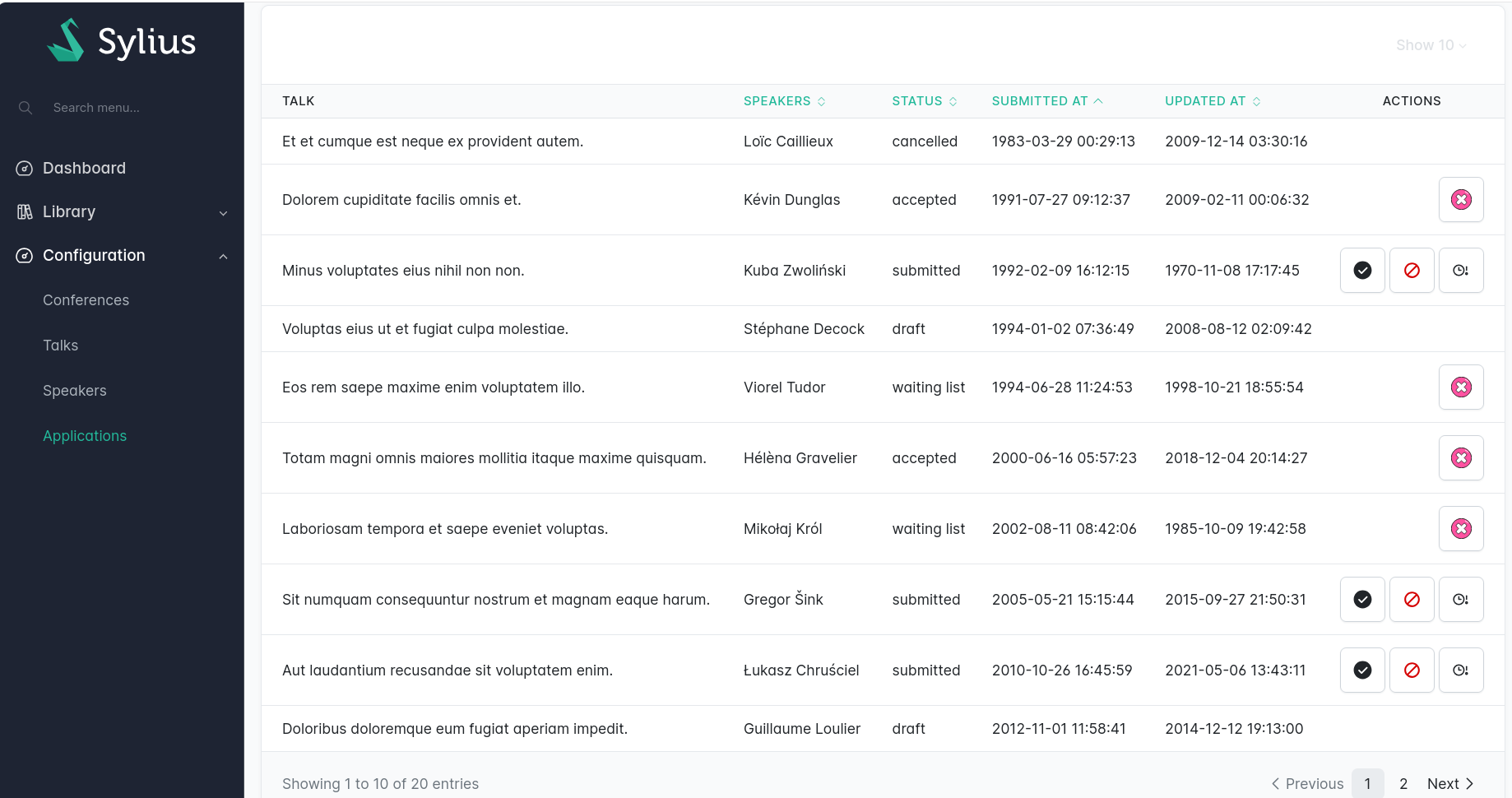
> For the complete documentation index, see [llms.txt](https://stack.sylius.com/llms.txt). Markdown versions of documentation pages are available by appending `.md` to page URLs; this page is available as [Markdown](https://stack.sylius.com/cookbook/admin_panel/state_machine.md).
# State machine transitions
The Sylius Stack lets you leverage [Symfony Workflow](https://symfony.com/doc/current/workflow.html) to apply **state machine transitions** directly from your grids or Twig templates using `actions`. If you're not familiar with workflows and state machines in Symfony, read [this article](https://symfony.com/doc/current/workflow/workflow-and-state-machine.html).
## Install Symfony Workflow
You need to install [Symfony Workflow](https://symfony.com/doc/current/workflow.html)
```bash
composer require symfony/workflow
```
## Example workflow configuration
Then, you need to set up your own workflow. In this example, we will assume a speaker can submit an application for a talk at a conference (the famous "Call for Papers" !).
An application for a talk starts a `draft`, then it can be `submitted` by the speaker.
In this admin interface, we will "allow" admin users to either :
* `accept` an application
* `reject` an application
* put an application on a `waiting list`
* `cancel` an application (this action could possibly be done by the speaker themselves too if they couldn't make it anymore to the conference event)
### Symfony workflow config
We therefore need to register our config. This is done in `config/packages/workflow.yaml`.
For the purpose of this example, we've placed the config in a separate PHP file, which we then imported in `config/packages/workflow.yaml` this way :
{% code title="config/packages/workflow\.yaml" lineNumbers="true" %}
```yaml
imports:
- { resource: '../workflows/**/*.php' }
framework:
workflows: null
```
{% endcode %}
{% code title="config/workflows/application.php" lineNumbers="true" %}
```php
extension('framework', [
'workflows' => [
'application' => [
'type' => 'state_machine',
'initial_marking' => ApplicationStatus::DRAFT->value,
'marking_store' => [
'property' => 'status',
],
'supports' => [
Application::class,
],
'audit_trail' => [
'enabled' => true,
],
'places' => [
ApplicationStatus::SUBMITTED->value,
ApplicationStatus::ACCEPTED->value,
ApplicationStatus::REJECTED->value,
ApplicationStatus::WAITING_LIST->value,
ApplicationStatus::CANCELLED->value,
],
'transitions' => [
'submit' => [
'from' => ApplicationStatus::DRAFT->value,
'to' => ApplicationStatus::SUBMITTED->value,
],
'accept' => [
'from' => ApplicationStatus::SUBMITTED->value,
'to' => ApplicationStatus::ACCEPTED->value,
],
'reject' => [
'from' => ApplicationStatus::SUBMITTED->value,
'to' => ApplicationStatus::REJECTED->value,
],
'hold' => [
'from' => ApplicationStatus::SUBMITTED->value,
'to' => ApplicationStatus::WAITING_LIST->value,
],
'cancel' => [
'from' => [ApplicationStatus::ACCEPTED->value, ApplicationStatus::WAITING_LIST->value],
'to' => ApplicationStatus::CANCELLED->value,
],
],
],
],
]);
};
```
{% endcode %}
### Create a Resource and Grid
Now, we need to create a Sylius resource and a Sylius grid to manage our `Applications`.
First, let's create an `Application` resource :
{% code title="src/Entity/Application.php" lineNumbers="true" %}
```php
id;
}
public function getSubmittedAt(): ?\DateTimeImmutable
{
return $this->submittedAt;
}
public function setSubmittedAt(\DateTimeImmutable $submittedAt): static
{
$this->submittedAt = $submittedAt;
return $this;
}
public function getTalk(): ?Talk
{
return $this->talk;
}
public function setTalk(Talk $talk): static
{
$this->talk = $talk;
return $this;
}
public function getStatus(): ?ApplicationStatus
{
return $this->status;
}
public function setStatus(ApplicationStatus $status): static
{
$this->status = $status;
return $this;
}
public function getUpdatedAt(): ?\DateTimeImmutable
{
return $this->updatedAt;
}
public function setUpdatedAt(\DateTimeImmutable $updatedAt): static
{
$this->updatedAt = $updatedAt;
return $this;
}
}
```
{% endcode %}
The resource is linked up to a standard Sylius Grid :
{% code title="src/Grid/ApplicationGrid.php" lineNumbers="true" %}
```php
withFilters(
EntityFilter::create(name: 'conference', resourceClass: Conference::class, fields: ['talk.conference'])
->setLabel('app.ui.conference')
->addFormOption('choice_label', 'name'),
Filter::create(name: 'speaker', type: SpeakerFilter::class)
->setLabel('app.ui.speaker')
->setOptions(['fields' => ['talk.speakers.id']]),
StringFilter::create('search', ['talk.title'])
->setLabel('sylius.ui.search'),
EnumFilter::create(name: 'status', enumClass: ApplicationStatus::class, field: 'status')
->addFormOption('choice_value', fn (?ApplicationStatus $enum) => $enum?->value)
->addFormOption('choice_label', fn (ApplicationStatus $choice) => ucfirst($choice->value))
->setLabel('app.ui.status'),
DateFilter::create('submittedAt')
->setLabel('app.ui.submitted_at'),
)
->withFields(
StringField::create('talk.title')
->setLabel('app.ui.talk'),
TwigField::create(name: 'talk.speakers', template: 'talk/grid/field/speakers.html.twig')
->setLabel('app.ui.speakers')
->setSortable(true),
EnumField::create('status')
->setLabel('app.ui.status')
->setSortable(true),
DateTimeField::create('submittedAt')
->setLabel('app.ui.submitted_at')
->setSortable(true),
DateTimeField::create('updatedAt')
->setLabel('app.ui.updated_at')
->setSortable(true),
)
}
}
```
{% endcode %}
### State machine transition operations
To enable your state machine transitions, you need to add an `ApplyStateMachineTransition` operation for each of the operations you want to enable on your Resource.
{% code title="src/Entity/Application.php" lineNumbers="true" %}
```php
### State machine transition actions
#### Actions in Grids
Once the operation has been added to your Resource, you can simply add an `ApplyTransitionAction` button on your grid.
{% code title="src/Grid/ApplicationGrid.php" lineNumbers="true" %}
```php
withItemActions(
ApplyTransitionAction::create(name: 'accept', route: 'app_admin_application_accept')
->setIcon('ep:success-filled')
->setLabel('app.ui.accept'),
ApplyTransitionAction::create(name: 'reject', route: 'app_admin_application_reject')
->setIcon('flat-color-icons:cancel')
->setLabel('app.ui.reject'),
ApplyTransitionAction::create(name: 'hold', route: 'app_admin_application_hold')
->setIcon('iconmind:wait-approval-outline-thin')
->setLabel('app.ui.hold'),
ApplyTransitionAction::create(name: 'cancel', route: 'app_admin_application_cancel')
->setIcon('streamline-stickies-color:cancel-2')
->setLabel('app.ui.cancel'),
);
}
}
```
{% endcode %}
The Sylius Stack will automatically enable your state machine transition action if the action can be executed according to the workflow configuration you set up.
#### Actions in Twig templates
You can also include your transition button actions in any Twig template by leveraging the `workflow_can` function. The button will only be generated when your Symfony Workflow config allows it.
{% code lineNumbers="true" %}
```twig
{% if workflow_can(application, 'cancel') %}
{% endif %}
```
{% endcode %}
---
# Agent Instructions
This documentation is published with GitBook. GitBook is the documentation platform designed so that both humans and AI agents can read, navigate, and reason over technical content effectively. Learn more at gitbook.com.
## Querying This Documentation
If you need additional information that is not directly available in this page, you can query the documentation by asking a question.
Perform an HTTP GET request on the following URL with the `ask` and `goal` query parameters:
```
GET https://stack.sylius.com/cookbook/admin_panel/state_machine.md?ask=&goal=
```
`ask` is the immediate question: it should be specific, self-contained, and written in natural language.
`goal` is what the user is ultimately trying to achieve, the reason they need the answer. Sharing it helps GitBook give you a better, more relevant answer. A goal is most helpful when it describes the outcome the user wants rather than restating the question. For example, with `ask=how do I create an API token`, a goal like `automate deployments from our CI pipeline` lets GitBook tailor the answer to that use case.
The response will contain a direct answer to the question and relevant excerpts and sources from the documentation.
Use this mechanism when the answer is not explicitly present in the current page, you need clarification or additional context, or you want to retrieve related documentation sections.