> For the complete documentation index, see [llms.txt](https://stack.sylius.com/llms.txt). Markdown versions of documentation pages are available by appending `.md` to page URLs; this page is available as [Markdown](https://stack.sylius.com/cookbook/ddd_architecture/grid.md).
# Operation using a grid
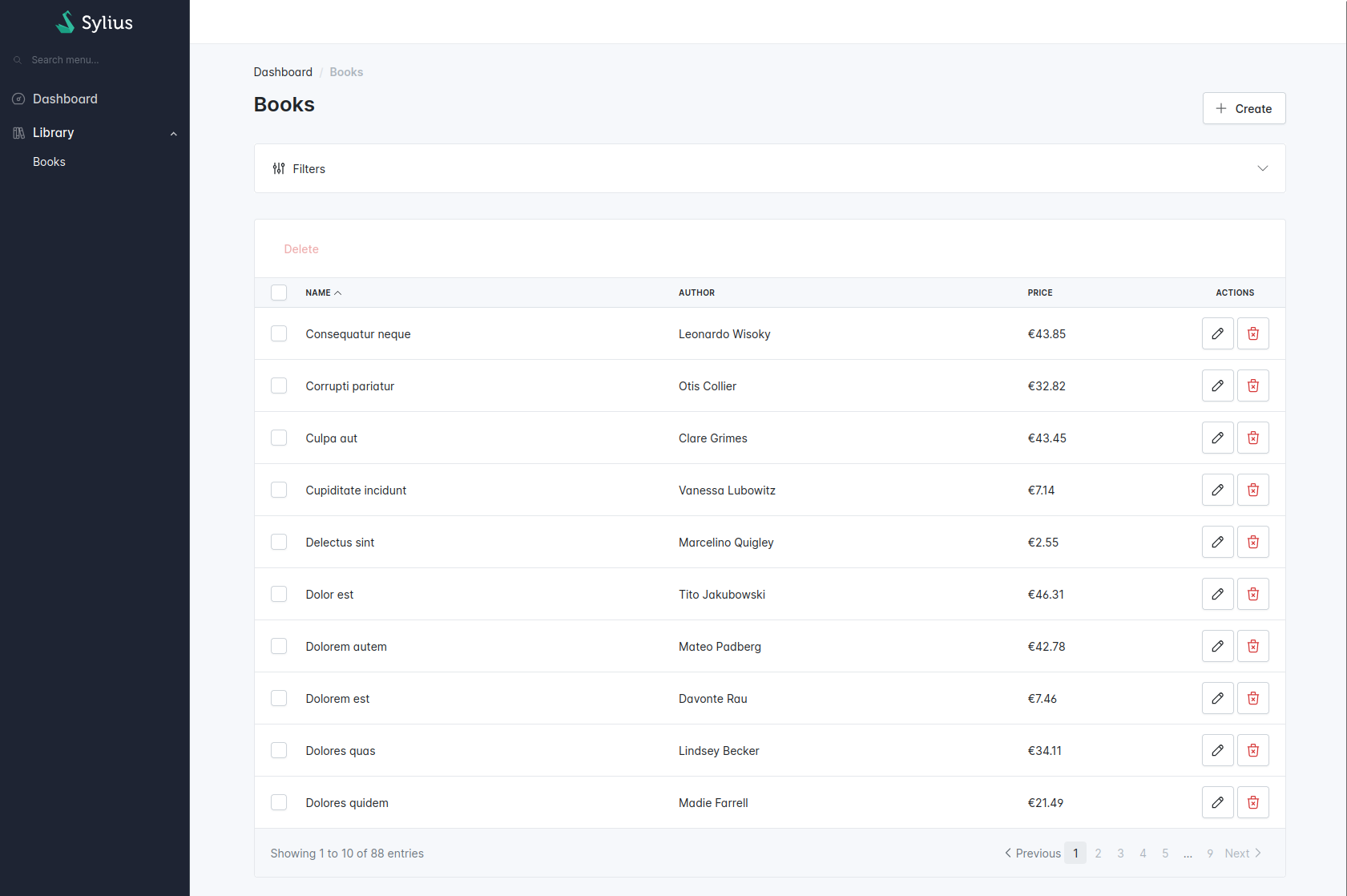
In previous chapters, we have created the Sylius resource and basic operations. Now we need to create the index operation using a Grid. To achieve that, we reuse the query we already have in the Application folder to create a grid provider.
```txt
src
├── BookStore
│ ├── Application
│ │ └── Query
│ │ ├── FindBooksQuery.php
│ │ └── FindBooksQueryHandler.php
│ ├── Domain
│ └── Infrastructure
│ └── Sylius
│ └── Grid
│ ├── Filter
│ │ ├── AuthorFilter.php
│ │ └── AuthorFilterType.php
│ ├── BookGrid.php
│ └── BookGridProvider.php
└── Shared
└── Infrastructure
└── Sylius
└── Grid
└── GridPageResolver.php
```
## Book list
In the Application folder, we already have this `FindBooksQuery`:
{% code title="src/Bookstore/Application/Query/FindBooksQuery.php" lineNumbers="true" %}
```php
declare(strict_types=1);
namespace App\BookStore\Application\Query;
use App\BookStore\Domain\Repository\BookRepositoryInterface;
use App\BookStore\Domain\ValueObject\Author;
use App\Shared\Application\Query\QueryInterface;
/**
* @implements QueryInterface
*/
final readonly class FindBooksQuery implements QueryInterface
{
public function __construct(
public ?Author $author = null,
public ?int $page = null,
public ?int $itemsPerPage = null,
public ?bool $alphabeticalSortingAsc = null,
public ?bool $alphabeticalSortingDesc = null,
) {
}
}
```
{% endcode %}
And its query handler:
{% code title="src/Bookstore/Application/Query/FindBooksQueryHandler.php" lineNumbers="true" %}
```php
namespace App\BookStore\Application\Query;
use App\BookStore\Domain\Repository\BookRepositoryInterface;
use App\Shared\Application\Query\AsQueryHandler;
#[AsQueryHandler]
final readonly class FindBooksQueryHandler
{
public function __construct(private BookRepositoryInterface $bookRepository)
{
}
public function __invoke(FindBooksQuery $query): BookRepositoryInterface
{
$bookRepository = $this->bookRepository;
if (null !== $query->author) {
$bookRepository = $bookRepository->withAuthor($query->author);
}
if (null !== $query->page && null !== $query->itemsPerPage) {
$bookRepository = $bookRepository->withPagination($query->page, $query->itemsPerPage);
}
if ($query->alphabeticalSortingAsc) {
$bookRepository = $bookRepository->withAscendingAlphabeticalSorting();
}
if ($query->alphabeticalSortingDesc) {
$bookRepository = $bookRepository->withDescendingAlphabeticalSorting();
}
return $bookRepository;
}
}
```
{% endcode %}
The idea is to reuse this query to list book from your storage for your "index" operation.
### Create a page helper
To resolve current page and items per page in the grid provider, we can use this helper:
{% code title="src/Shared/Infrastructure/Sylius/Grid/GridPageResolver.php" lineNumbers="true" %}
```php
declare(strict_types=1);
namespace App\Shared\Infrastructure\Sylius\Grid;
use Sylius\Component\Grid\Definition\Grid;
use Sylius\Component\Grid\Parameters;
class GridPageResolver
{
public static function getCurrentPage(Grid $grid, Parameters $parameters): int
{
return $parameters->has('page') ? (int) $parameters->get('page') : 1;
}
public static function getItemsPerPage(Grid $grid, Parameters $parameters): int
{
return $parameters->has('limit') ? (int) $parameters->get('limit') : $grid->getLimits()[0] ?? 10;
}
}
```
{% endcode %}
### Create the BookGridProvider
First, we need to create the `BookGridProvider`.
{% code title="src/BookStore/Infrastructure/Sylius/Grid/BookGridProvider.php" lineNumbers="true" %}
```php
declare(strict_types=1);
namespace App\BookStore\Infrastructure\Sylius\Grid;
use App\BookStore\Application\Query\FindBooksQuery;
use App\BookStore\Domain\ValueObject\Author;
use App\BookStore\Infrastructure\Sylius\Resource\BookResource;
use App\Shared\Application\Query\QueryBusInterface;
use App\Shared\Infrastructure\Sylius\Grid\GridPageResolver;
use Pagerfanta\Adapter\FixedAdapter;
use Pagerfanta\Pagerfanta;
use Pagerfanta\PagerfantaInterface;
use Sylius\Component\Grid\Data\DataProviderInterface;
use Sylius\Component\Grid\Definition\Grid;
use Sylius\Component\Grid\Parameters;
use Webmozart\Assert\Assert;
final readonly class BookGridProvider implements DataProviderInterface
{
public function __construct(
private QueryBusInterface $queryBus,
) {
}
public function getData(Grid $grid, Parameters $parameters): PagerfantaInterface
{
$models = $this->queryBus->ask(new FindBooksQuery(
page: GridPageResolver::getCurrentPage($grid, $parameters),
itemsPerPage: GridPageResolver::getItemsPerPage($grid, $parameters),
));
$data = [];
foreach ($models as $model) {
$data[] = BookResource::fromModel($model);
}
$paginator = $models->paginator();
Assert::notNull($paginator);
return new Pagerfanta(new FixedAdapter($paginator->getTotalItems(), $data));
}
}
```
{% endcode %}
### Create the BookGrid
Now, we need to create the `BookGrid`.
{% code title="src/BookStore/Infrastructure/Sylius/Grid/BookGrid.php" lineNumbers="true" %}
```php
declare(strict_types=1);
namespace App\BookStore\Infrastructure\Sylius\Grid;
use App\BookStore\Infrastructure\Sylius\Resource\BookResource;
use Sylius\Bundle\GridBundle\Builder\Action\CreateAction;
use Sylius\Bundle\GridBundle\Builder\Action\DeleteAction;
use Sylius\Bundle\GridBundle\Builder\Action\UpdateAction;
use Sylius\Bundle\GridBundle\Builder\Field\StringField;
use Sylius\Bundle\GridBundle\Builder\Field\TwigField;
use Sylius\Bundle\GridBundle\Builder\GridBuilderInterface;
use Sylius\Bundle\GridBundle\Grid\AbstractGrid;
use Sylius\Bundle\GridBundle\Grid\ResourceAwareGridInterface;
final class BookGrid extends AbstractGrid implements ResourceAwareGridInterface
{
public static function getName(): string
{
return self::class;
}
public function buildGrid(GridBuilderInterface $gridBuilder): void
{
$gridBuilder
->setProvider(BookGridProvider::class) // The Grid provider we have just created
->withFields(
StringField::create('name'),
StringField::create('author'),
)
->withMainActions(
CreateAction::create(),
)
->withItemActions(
UpdateAction::create(),
DeleteAction::create(),
)
->withBulkActions(
DeleteAction::create(),
)
;
}
public function getResourceClass(): string
{
return BookResource::class;
}
}
```
{% endcode %}
### Add the grid on the Book Resource
Now that we have a grid, let's add it to the "index" operation on our `BookResource`.
{% code title="src/BookStore/Infrastructure/Sylius/Resource/BookResource.php" lineNumbers="true" %}
```php
// ...
use App\BookStore\Infrastructure\Sylius\Grid\BookGrid;
use App\BookStore\Infrastructure\Symfony\Form\BookResourceType;
use Sylius\Resource\Metadata\AsResource;
use Sylius\Resource\Metadata\Index;
use Sylius\Resource\Model\ResourceInterface;
// ...
#[AsResource(
// ...
formType: BookResourceType::class, // Define the form type for all your operations
operations: [
// ...
new Index(
grid: BookGrid::class, // the grid we have just created
),
],
)]
final class BookResource implements ResourceInterface
{
// ...
}
```
{% endcode %}
### Create the Author filter type
Let's imagine we want to be able to filter books by their author within our grid. First, we need to create a Symfony form type for our custom author filter.
{% code title="src/BookStore/Infrastructure/Sylius/Grid/Filter/AuthorFilterType.php" lineNumbers="true" %}
```php
declare(strict_types=1);
namespace App\BookStore\Infrastructure\Sylius\Grid\Filter;
use App\BookStore\Application\Query\FindBooksQuery;
use App\BookStore\Domain\Model\Book;
use App\Shared\Application\Query\QueryBusInterface;
use Symfony\Component\Form\AbstractType;
use Symfony\Component\Form\Extension\Core\Type\ChoiceType;
use Symfony\Component\OptionsResolver\OptionsResolver;
final class AuthorFilterType extends AbstractType
{
public function __construct(
private readonly QueryBusInterface $queryBus,
) {
}
public function configureOptions(OptionsResolver $resolver): void
{
$resolver->setDefaults([
'placeholder' => 'sylius.ui.all',
'choices' => $this->getChoices(),
]);
}
public function getParent(): string
{
return ChoiceType::class;
}
private function getChoices(): array
{
// We do not have any findAuthorsQuery
// Authors are stored in the Book resource
$models = $this->queryBus->ask(new FindBooksQuery());
$choices = [];
/** @var Book $model */
foreach ($models as $model) {
$choices[$model->author()->value] = $model->author()->value;
}
ksort($choices);
return $choices;
}
}
```
{% endcode %}
### Create the Author filter
{% code title="src/BookStore/Infrastructure/Sylius/Grid/Filter/AuthorFilter.php" lineNumbers="true" %}
```php
declare(strict_types=1);
namespace App\BookStore\Infrastructure\Sylius\Grid\Filter;
use Sylius\Component\Grid\Data\DataSourceInterface;
use Sylius\Component\Grid\Filtering\ConfigurableFilterInterface;
final readonly class AuthorFilter implements ConfigurableFilterInterface
{
public function apply(DataSourceInterface $dataSource, string $name, $data, array $options): void
{
throw new \RuntimeException('Not implemented'); // We cannot use the DataSource generic abstraction
}
public static function getFormType(): string
{
return AuthorFilterType::class; // The Symfony form type we have just created
}
public static function getType(): string
{
return self::class;
}
}
```
{% endcode %}
### Use the Author Filter on the Grid provider
{% code title="src/BookStore/Infrastructure/Sylius/Grid/BookGridProvider.php" lineNumbers="true" %}
```php
final readonly class BookGridProvider implements DataProviderInterface
{
// ...
public function getData(Grid $grid, Parameters $parameters): PagerfantaInterface
{
/** @var array $criteria */
$criteria = $parameters->get('criteria', []); // Getting the criteria from query params
$models = $this->queryBus->ask(new FindBooksQuery(
author: !empty($criteria['author'] ?? null) ? new Author($criteria['author']) : null,
page: GridPageResolver::getCurrentPage($grid, $parameters),
itemsPerPage: GridPageResolver::getItemsPerPage($grid, $parameters),
));
// ...
}
}
```
{% endcode %}
---
# Agent Instructions
This documentation is published with GitBook. GitBook is the documentation platform designed so that both humans and AI agents can read, navigate, and reason over technical content effectively. Learn more at gitbook.com.
## Querying This Documentation
If you need additional information that is not directly available in this page, you can query the documentation dynamically by asking a question.
Perform an HTTP GET request on the current page URL with the `ask` query parameter, and the optional `goal` query parameter:
```
GET https://stack.sylius.com/cookbook/ddd_architecture/grid.md?ask=&goal=
```
`ask` is the immediate question: it should be specific, self-contained, and written in natural language.
`goal` is optional and describes the broader end goal you are ultimately trying to accomplish on behalf of the user. GitBook uses it to tailor the answer towards what is most useful for that goal.
The response will contain a direct answer to the question and relevant excerpts and sources from the documentation.
Use this mechanism when the answer is not explicitly present in the current page, you need clarification or additional context, or you want to retrieve related documentation sections.